
# Monorepo/Vue App Flow and Principles
The monorepo is centered mostly around the tools and capabilities to develop the Admin UI, or rs-admin-ui package, more efficiently.
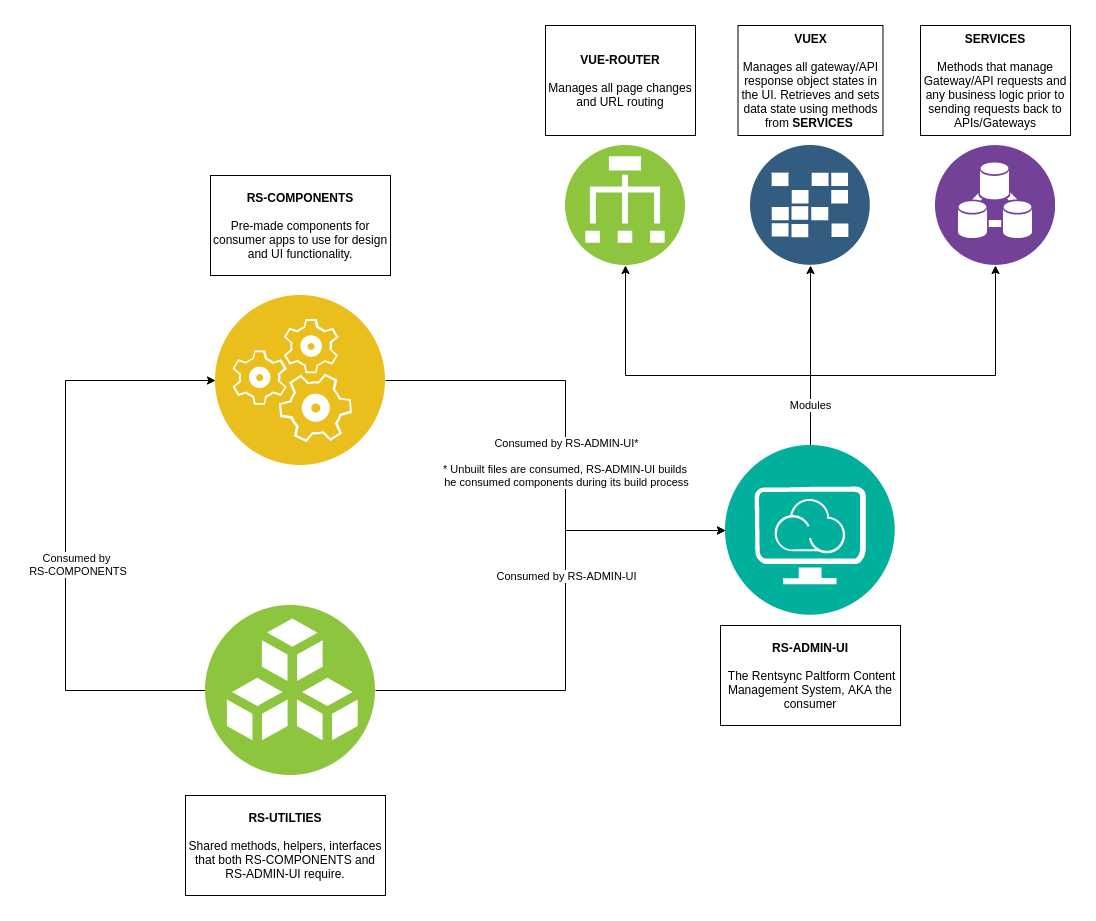
The Admin UI uses both rs-utilities amd rs-components to assemble its markup and functionality. Additionally, common modules like vue-router and Vuex for managing data request state.
Refer to the diagram below as a cheatsheet for how the UI makes use of various packages/plugin/modules (click image to expand):
# RS Components
This package contains all the styling and functionality of our Vue components. They are organized as SFC (Single File Components) that work in isolation and manage their own states.
All components use Vue props to receive state, and will often transmit state changes back using Vue's $emit. We have also developed a method for components to communicate emitted events to higher levels in the component tree than simply immediate parent components. Please refer to our mixin code in RS Utilities for this.
RS Components is a component library, and should thus never make use of VueX or anything that works independently in a consumer application. It manages its own state with the props given to it, and emits those changes back to the consuming app.
# Design Principles for RS Components
- No
VueXstore or routing inRS Components. - The size of a component is defined by a hierarchy, from smallest to largest. This hierarchy is
atoms,molecules,organisms,templates. The package'ssrc/componentsdirectory has these as directories. - Many components are composed of smaller components to allow for DRYer development, thus making prop felxibility very important.
- The component library's consumers import a
components.jsfile to load all components from the component library. If you add a component, runnpx lerna run build:generateto regernatecomponents.jswith your newly added component. - Components use props to receive data state from the consumer (
RS Admin UI), and use Vue's event emitting system to notify the consumer of data state changes, passing the data back through the emitting process. - Props should be defined (even passing through parent components) liberally to make these components as flexible as possible.
- Wherever possible,
RS Componentscomponents should use thev-modelinput/value cycle in form elements (inputs, selects, etc.) or show/hide (modal, off canvas, etc.) components. Not sure how to implementv-modelin custom components? Refer to Vue's docs and also check this article out for good examples.
# RS Utilities
A shared set of TypeScript interfaces, Vue plugins, mixins, and helper functions that RS Components and RS Admin UI share. While we try to keep those two projects independent, they need to share common structures in some cases, and this package acts as a medium for these shared pieces.
A common example of a utility is in implementing a TypeScript Interface for a component's props in RS Components. Given that these props are using an interface, they become strongly typed. Thus, it only makes sense that the Admin UI should be aware of this interface, and be able to type-check the prop values it passes to this component.
# Design Principles for RS Utilities
- Should contain ALL shared interface / types so that consumer applications (
RS Admin UI) better understands the shape of props passed to theRS Componentscomponents. - If there is something ALL components should have as default props / state / methods, add it to the
mixininRS Utilities. Any new items added to this must also be declared in theIRentsyncVueInstanceinterface ofRS Utilitiesif using TypeScript. Use Vue's docs to familiarize yourself withmixinconcepts if you do not know how to use mixins. - For global static methods, use the
$utilsplugin offered inRS Utilities. This plugin exposes global methods to the Vue instance. The$utilsare defined in/src/plugin.tsinRS Utilities. BothRS ComponentsandRS Admin UIhave access to the$utilsobject in their Vue instances. MAKE SURE to add any new utilities definitions to theIUtilsinterface inRS Utilities
# RS Admin UI
The Rentsync platform's content management system, where clients will modify their properties, syndication feeds, users, leads, promotions, etc.
The Admin UI is a consumer application, where it is consuming both RS Components and RS Utilities to implement our user interface and experience.
# The Admin UI as a Consumer
- Retrieves and sends data to/from our backend infrastructure
- Manages backend response state using the
VueXstore pattern. - Passes data state to the props of
RS Componentscomponents. - Receives prop changes & events from the consumed components and modifies the data state.
- If necessary, sends the changed data state back to the backend infrastructure to be processed.
- Implements
RS Utilitiesto make use of common functions, interfaces, types, mixins, and plugins. - Manages page state and application layout using
Vue-Routerand the/viewsdirectory. - Uses
routemeta objects defined in theRS UtilitiesinterfaceIRouteConfigMetafor page settings, route permissions, etc.
# The Admin UI's Store/Service Separation Principle
- The Admin UI separates state management and HTTP request logic.
- HTTP requests and minor business logic go into
servicesfiles, located at/src/services - State is configured using
VueXstore modules in/src/store - The store's primary function is to set data state (setting data that is retrieved / processed by the backend)
- To set data state, the store will call functions in
services. - The store uses
actionsto executeservicemethods. - The store uses
mutationswithin theactionmethods to setstateobjects using the service's return result. - The store uses
gettersto releasestateobjects to the UI views/components. - For every service module (ex:
src/services/amenities.ts, there is typically an associated store module (src/store/modules/amenities.ts) - For example, to retrieve a list of
amenities, a method would be defined in/src/services/amenities.tsto retrieve the data from the backend. The store would dispatch this method using anactionand assign state once it recieves the response using amutation. It would then release this state for use in the UI's views/components usinggetters.
# Overall Important Development Principles
- Store state and HTTP requests are managed in the consumer application (
RS Admin UI). RS Componentscomponents use props to receive data state from the consumer (RS Admin UI), and uses Vue's event emitting system to notify the consumer of data state changes.RS ComponentsDOES NOT USE A STORE NOR MAKES HTTP REQUESTS.- Common functions, interfaces, or global features that both consumer and components library should share must go in
RS-Utilities.